AI automation for ecommerce: 7 workflows agencies build in 2026
By Supriya · · 15 min read
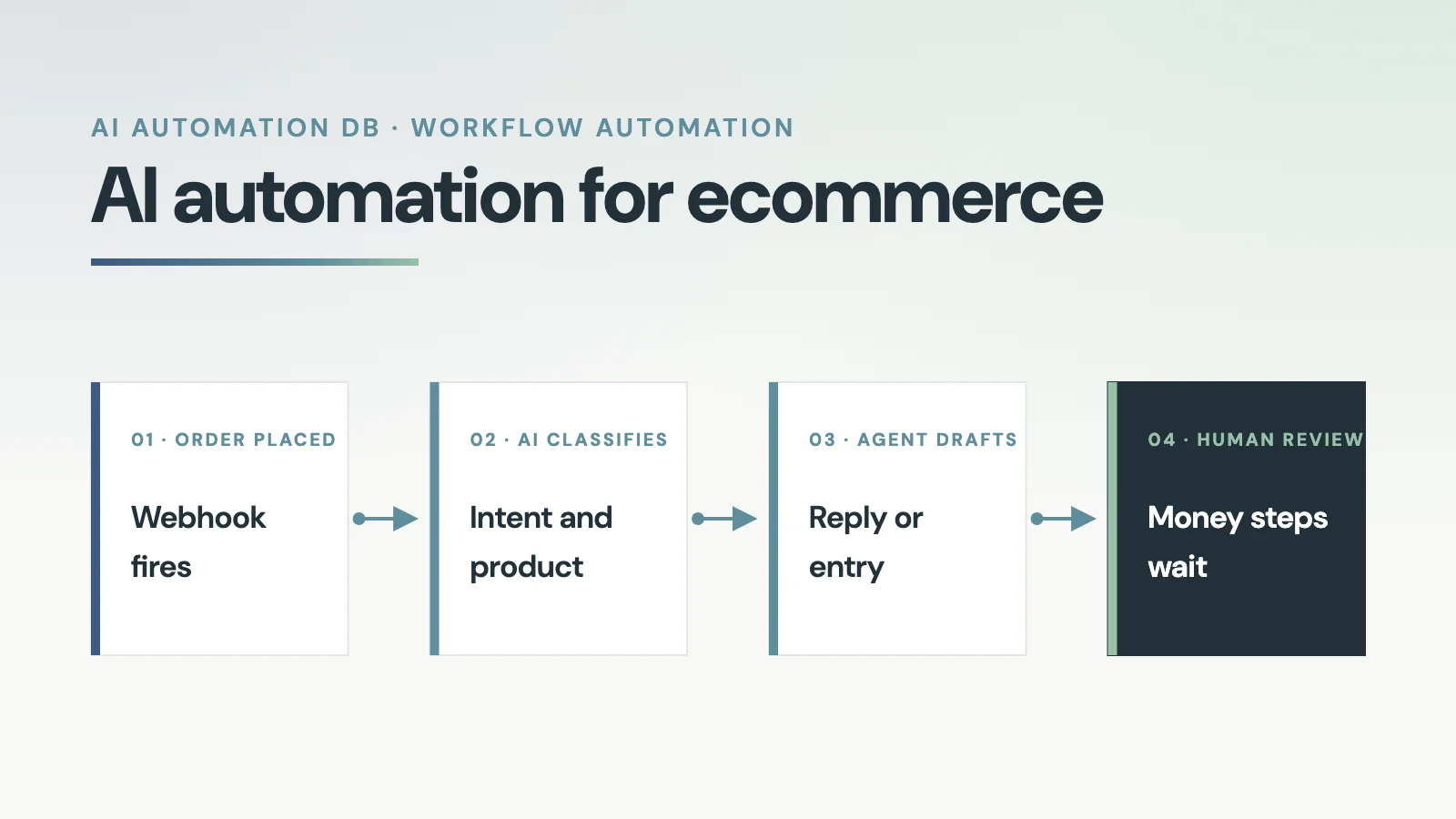
Most stores do not need a custom model. They need webhooks, a few rules and one AI step in the right place. That is what AI workflow automation for ecommerce looks like in practice. This guide covers seven workflows. An AI automation agency for ecommerce brands typically builds them. Agencies sell these as ecommerce automation services. This list suits an AI automation agency for workflow optimization in ecommerce brands. It also serves anyone planning AI automation for ecommerce brands of any size. Good AI process automation for ecommerce starts with one narrow job. Each one shows how it runs, where AI helps and where it breaks.
Sources and method: Platform facts come from official Shopify and WooCommerce documentation. Agency examples come from the agencies' own case studies, read on 24 November 2026. Directory counts are approved AI Automation DB listings on that date.
What AI automation for ecommerce actually is
AI automation for ecommerce: software that hears store events. It uses a language model for judgement calls. It writes the result back to your systems. A person approves anything risky.
Three parts do the work.
- Trigger: a webhook or a schedule. The store tells your tool that something changed.
- Rules: plain if-then logic. It handles anything you can write down exactly.
- AI step: a model reads messy text or images. It returns a label or a draft.
Rules are cheaper and predictable. AI is flexible and sometimes wrong. Good agencies use rules wherever a rule works. They add the model only for the fuzzy step. Our guide on what to automate first explains how to pick that step.
How the plumbing works on Shopify and WooCommerce
Shopify webhooks push near-real-time data when an order, product or return changes. They replace constant polling. Three rules from Shopify's delivery documentation matter.
- Verify the HMAC signature before trusting any payload.
- Expect duplicate deliveries. Use the delivery ID to detect them.
- Answer within five seconds, then do the slow work in a queue.
If Shopify gets no valid reply, it retries eight times over four hours. After eight failures, an Admin API subscription is deleted. A silent webhook is a real failure mode. Add an alert for missing events.
WooCommerce works similarly. Its webhook documentation says more than five consecutive failures disable a webhook. A server outage can switch off your automation without any visible error.
APIs have limits too. Shopify uses a leaky-bucket model for its API rate limits. A bulk catalogue update can hit the limit and stall. Good builds batch writes and retry with a delay.
The 7 ecommerce workflows at a glance
The table shows where AI works and where plain rules should stay in charge.
| Workflow | Trigger | AI does | Rules do | Human approves |
|---|---|---|---|---|
| Support and returns | New ticket or return request | Classifies intent, drafts reply | Checks policy window and order status | Refunds above a limit |
| Customs and HS codes | Cross-border order | Suggests a code from the description | Blocks low-confidence matches | Every new product code |
| Product data | New product or photo | Writes titles, tags, attributes | Enforces length and required fields | First batch, then samples |
| Inventory alerts | Stock level change | Flags unusual patterns | Reorder thresholds, channel sync | Purchase orders |
| Reviews and UGC | Review posted | Sorts sentiment, drafts reply | Routes by rating | Public replies |
| Post-purchase and cart | Order fulfilled or cart left | Personalises copy | Timing, suppression lists | Campaign launches |
| Finance reconciliation | Payout or refund | Explains mismatches | Matches payouts to orders | Journal entries |
1. Support triage and returns
Support is the first workflow most stores automate. It has high volume and clear rules.
How it works. A ticket or return request arrives from the helpdesk. The workflow looks up the order through the platform API. The model labels the intent: where is my order, wrong size, damaged item. Rules then check the return window and item status. The model drafts a reply. A person gives human approval for anything with money attached.
AI versus rules. Rules decide eligibility. The return window is a date comparison, not a judgement call. The model reads the customer's message and writes the tone. Do not let a model decide a refund.
Failure modes.
- The model invents a policy that does not exist. Pass the real policy text in every prompt.
- Order lookups fail on guest checkouts with no customer ID. Match on order number and email.
- Refund loops happen when two automations both react to a refund event.
Agency example. FactoryJet, a US agency, lists an ecommerce AI agents page. Its agent answers order and return tickets from live data and drafts the reply. FactoryJet says refunds above your limit wait for a person. Its site describes the pattern for Zendesk, Gorgias, Intercom and Shopify. The page describes a service, not a measured result. See its AI Automation DB profile.
Buyers of chat-first support can also read our guide to AI chatbot development agencies. Browse the customer support use case for more agencies.
2. Order and customs classification for cross-border shipping
AI customs automation for ecommerce is the most searched topic on our site. It is also the thinnest in agency proof. Treat it with care.
How it works. A cross-border order triggers a workflow. It reads the product title, description and material. A model suggests an HS code, short for Harmonized System code. The World Customs Organization says the HS uses a six-digit code. It covers more than 5,000 commodity groups. More than 200 countries and economies use it for tariffs and trade statistics. The code then feeds duty estimates and customs paperwork. This is what AI customs automation ecommerce teams mean in practice.
AI versus rules. The model proposes. Rules enforce. A rule can reject any suggestion below a confidence score. Another rule can reuse an approved code for a known SKU. Store each approved code against the SKU. The model then runs once per product.
Failure modes.
- A vague description like "gift set" gives the model too little.
- A wrong code can change duty owed and cause clearance delays.
- Rules differ by destination country. A code accepted in one market may need review in another.
Treat the model as an assistant to a licensed customs broker. It is not a replacement. This guide is not legal or customs advice.
Agency example. We checked the e-commerce agencies in our search-demand pool. None published a customs-classification case study. Anyone selling this service should show a named client and an error rate. Ask for both. Want to hire AI expert for automation in ecommerce customs work? Ask which tariff database the build uses. Ask who signs off new codes.
3. Product data enrichment
Catalogues with thousands of SKUs have gaps. Titles are thin, attributes are missing and tags are inconsistent.
How it works. A new product event fires. This is the safest first AI step in ecommerce order management and catalogue work. The workflow sends the photo and supplier notes to a model. The model returns a title, description and attributes in a fixed format. Rules check length, banned words and required fields. The workflow writes the result back through the Admin API.
AI versus rules. The model writes. Rules format and validate. Keep a copy of the original text so you can roll back.
Failure modes.
- The model guesses a material or size from a photo. Never publish attributes that affect returns without review.
- Product IDs use Shopify's global ID format. A wrong format fails the write.
- Image URLs must be public, or the model sees nothing.
Agency example. Connex Digital, a US workflow agency, published a Shopify product listing automation. A new Shopify product triggers the flow. An AI tool reads the image and writes a title and description. The post gives no time saving, so we quote none. Connex also lists checks: public image URLs, correct product IDs and backup copies. See the Connex Digital profile.
4. Inventory alerts and channel sync
Overselling costs money and trust. It is worst for one-off items.
How it works. A sale on any channel fires a webhook. The workflow updates one master stock record. It then pushes the new count to every other channel. Rules fire alerts at reorder thresholds. A model can flag odd patterns, like a sales spike on one SKU.
AI versus rules. This workflow is mostly rules. Stock arithmetic must be exact. Use AI only for anomaly notes and for drafting supplier emails.
Failure modes.
- Edits made directly in a channel admin get overwritten on the next sync.
- Each channel has different title and category rules.
- Webhook gaps leave stock stale. Run a scheduled reconciliation as a backstop.
Agency example. SmallBay Digital, in India, published a sales channel inventory sync case study. A D2C watch reseller updated products by hand on Shopify, eBay and Chrono24. SmallBay built one product record in SmartSuite. Make pushes changes to each channel. The agency reports an 80% cut in update time. Launching a product fell from two to three hours to under 20 minutes. It reports zero listing mismatches in the 90 days after go-live. These are the agency's own figures. See the SmallBay Digital profile and the inventory management use case.
5. Review and user-generated content handling
Reviews drive trust, but replies take time.
How it works. A new review arrives. A rules step routes it by star rating. A model tags sentiment and topic, such as sizing, delivery or quality. For low ratings the workflow alerts the team and drafts a reply. Happy customers can be sent a prompt to share a public review.
AI versus rules. Routing by rating is a rule. Reading a review for the real complaint is a model job. Public replies should stay human-approved.
Failure modes.
- A "rating gate" may break review platform rules. Check each platform's terms first.
- Models misread sarcasm and mixed reviews.
- Auto-replies that sound generic harm the brand.
Agency example. Connex Digital published a post-purchase SMS review flow. It chains Shopify, Make and Twilio. It waits after fulfilment, asks for a one-to-five rating, then branches on the score. The post is a tutorial, not a client result. Note that the "gate" pattern needs a policy check before you copy it. More agencies work on this under reputation management.
6. Abandoned-cart and post-purchase flows
These flows sit between marketing and operations. Order data is the trigger.
How it works. A checkout left open becomes an abandoned cart. An order marked fulfilled also starts a timer. Rules decide timing, channel and suppression. Do not message customers who already bought or opted out. A model can personalise the copy from the cart contents and past orders. Email and SMS tools send it.
AI versus rules. Timing, consent and suppression are rules. The model only varies wording. A model should never decide who may be contacted.
Failure modes.
- Messages sent to opted-out customers create legal exposure.
- Discount logic loops can give the same code to everyone.
- Duplicate webhooks cause duplicate messages. Use the delivery ID to dedupe.
Agency example. FactoryJet lists a marketing agent. It drafts email, SMS and CRM campaigns in your brand voice. It names HubSpot, Klaviyo and Mailchimp and says every send gets one-click approval. We found no client numbers for this agent on the site. For campaign-heavy teams, our list of marketing automation agencies is a better starting point.
7. Finance reconciliation
Finance is where a quiet error costs the most.
How it works. Shopify Payments deducts fees and batches many orders into one payout. The workflow reads the payout, the orders and the refunds. It posts a summary journal to the accounting system. Rules match payout lines to orders. The model explains mismatches in plain words for the bookkeeper.
AI versus rules. Matching is arithmetic, so use rules. Use the model for exception notes. Never let it post a balancing entry on its own.
Failure modes.
- Posting gross order totals means the bank line never matches.
- Chargebacks need their own entry, separate from normal refunds.
- Partial refunds need their own credit note, linked to the original sale.
- Multi-region tax rarely maps to one accounting tax code.
Agency example. SmallBay Digital describes a Shopify and QuickBooks automation built around the payout. It posts gross sales, fees and net deposit as one journal. It flags a mismatch for review rather than forcing an entry. This page describes a service pattern, not a named client result. Browse the invoice processing use case and finance and accounting automation.
Worked example: what support automation saves
Here is a worked example with assumed numbers, not a client result. Replace them with your own.
- 10,000 orders a month.
- 8% of orders create a ticket: 800 tickets.
- Handling a ticket by hand takes 6 minutes.
- With an AI draft, a person reviews in 2 minutes.
- Loaded support cost is $25 an hour.
| Line | Calculation | Result |
|---|---|---|
| Minutes saved per ticket | 6 − 2 | 4 |
| Hours saved per month | 800 × 4 ÷ 60 | 53.3 |
| Labour saving | 53.3 × $25 | $1,333 |
| Model fees (assumed $0.02 a ticket) | 800 × $0.02 | $16 |
| Upkeep retainer (assumed) | flat | $300 |
| Net monthly gain | $1,333 − $16 − $300 | $1,017 |
| Payback on a $6,000 build (assumed) | $6,000 ÷ $1,017 | 5.9 months |
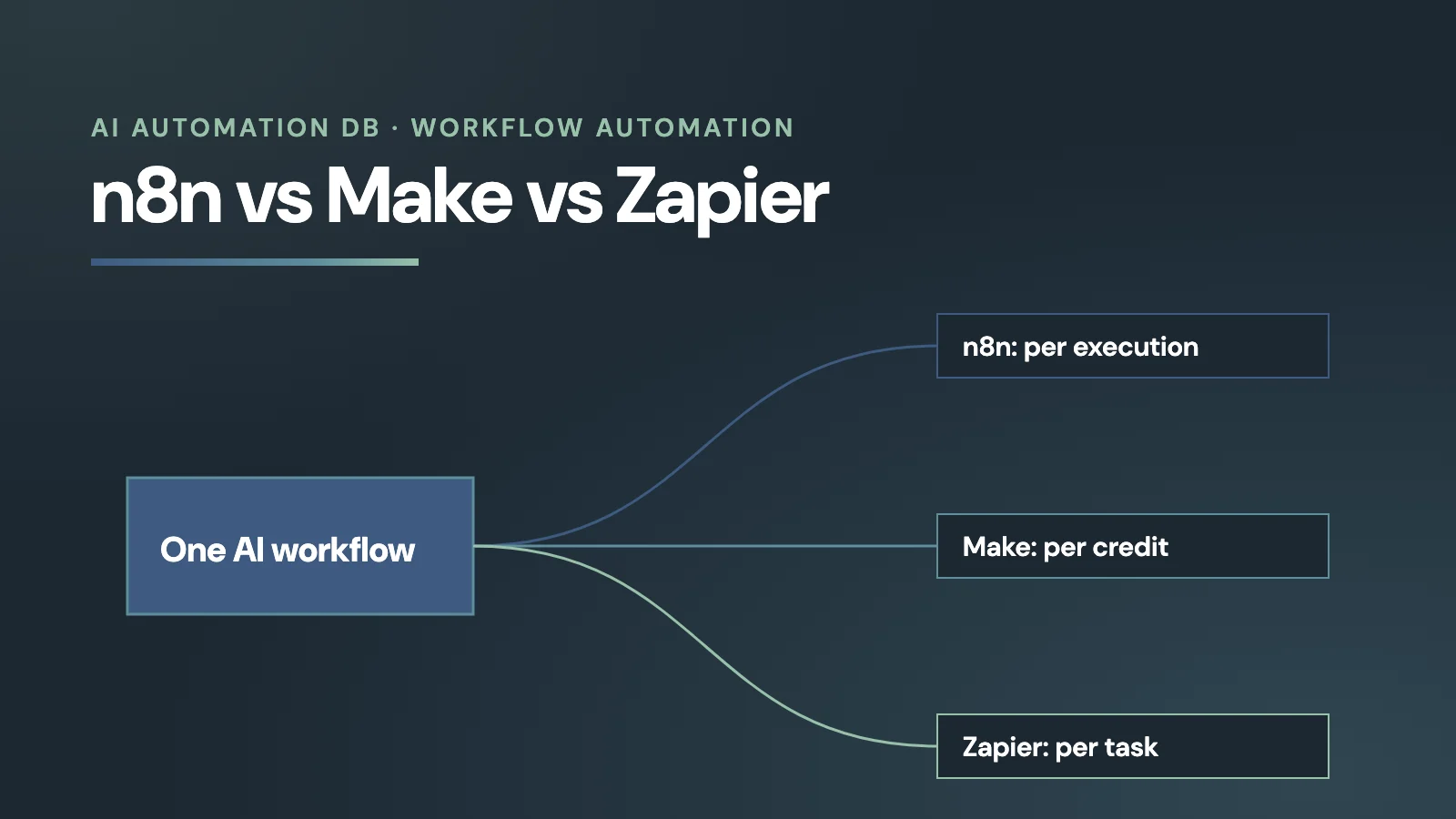
Platform billing also matters. n8n counts one execution per whole workflow run, per its pricing page. A step-based tool can cost more at 800 runs a month. Our n8n vs Make vs Zapier comparison shows the difference.
The sums change if only 40% of drafts are usable. Then savings fall to about $530 a month. Net gain drops to about $217, and payback passes two years. Test the draft acceptance rate on real tickets before you sign. Our ROI chapter gives a fuller method.
What ecommerce agencies on AI Automation DB offer
AI Automation DB lists 792 approved agencies (24 Nov 2026). Of those, 189 list e-commerce as an industry. Another 155 list retail. Together 280 list at least one of the two. An agency can list several industries.
Every listed AI ecommerce agency sits in the same directory. Among the 189 e-commerce agencies, 144 offer workflow automation and 140 offer AI agents. A total of 34 list customer support automation as a service. The United States leads with 52. India and Australia have 16 each.
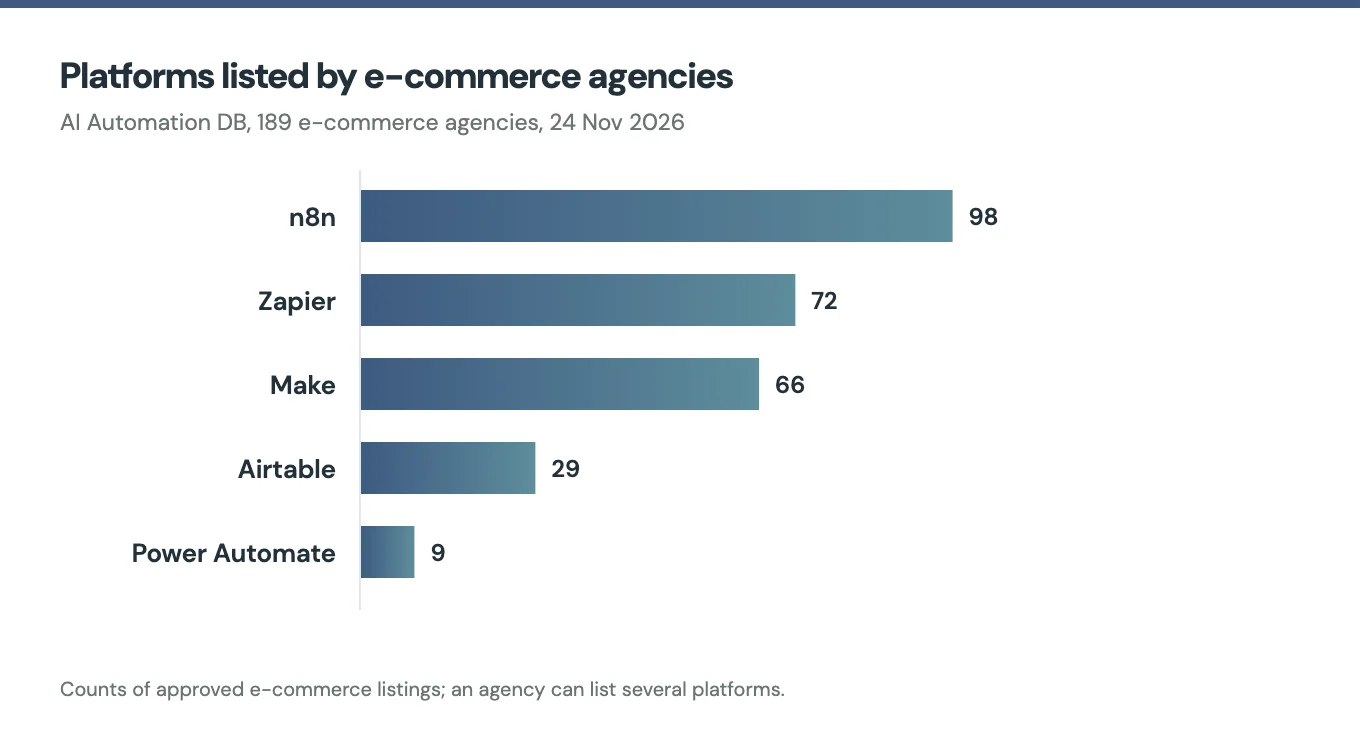
So n8n leads, ahead of Zapier and Make. This matches the whole directory. See the n8n and Make agency pages. For service filters, use the workflow automation hub.
Choosing an ecommerce automation agency
You can hire an AI consultant for automation in ecommerce. You can also pick a full AI automation agency for ecommerce. A consultant suits scoping. An agency suits build and upkeep. Use these checks.
- Ask for a named ecommerce client and a before-and-after number.
- Ask who owns the platform account, code and credentials.
- Ask how the build handles duplicate webhooks and failed deliveries.
- Ask which steps a person must approve.
- Ask for a fixed-scope pilot before a retainer.
The buyer's guide covers how to evaluate an agency and pricing. Broader cost ranges sit in our custom AI development cost post.
How to start with AI automation in ecommerce
Start small. One workflow, one metric, one approver.
- Pick one repeat job with clear rules, such as order-status tickets or stock sync.
- Count its volume, minutes per task and who does it today.
- Check whether your helpdesk or platform already ships a feature for it.
- Write the rules first. Mark the single step that needs a model.
- Subscribe to the store webhook, verify the signature and queue the work.
- Run a pilot with a person approving every draft for two to four weeks.
- Track draft acceptance rate, errors and minutes saved against your baseline.
- Widen scope only when the numbers hold, then add the next workflow.
Our chapter on scoping an AI automation pilot gives a template for step six.
Frequently asked questions
What is AI automation for ecommerce?
AI automation for ecommerce uses store events to trigger workflows. A model reads messy inputs such as tickets or product photos. Rules and people handle decisions that involve money. Typical jobs include support replies, product descriptions, stock sync and finance matching.
Which ecommerce tasks should I automate first?
Start with high-volume, rule-based work. Order-status tickets, stock sync and payout reconciliation are common first picks. They have clear inputs and measurable time saved. Keep refunds, duty codes and public replies with a person. Wait until the pilot shows low errors.
Can AI classify customs HS codes for ecommerce orders?
AI can suggest codes from product descriptions. The World Customs Organization describes the HS as a six-digit system. More than 200 countries use it. Treat AI output as a draft. A customs broker should approve codes. Send low-confidence matches to a person.
Does AI automation work with Shopify and WooCommerce?
Yes. Both platforms send webhooks when orders or products change, and both offer APIs. Shopify retries failed deliveries eight times over four hours. WooCommerce disables a webhook after more than five consecutive failures. Add alerts so a silent failure does not go unnoticed.
How much does AI automation for ecommerce cost?
Cost depends on scope. A single workflow often has a build fee and monthly upkeep. Platform and model fees add more. In the worked example above, a $6,000 build pays back in about six months. Those figures are assumptions, not quotes.
Should I hire an ecommerce automation agency or build in-house?
Hire an agency if you lack engineering time or want a fast pilot. Build in-house if workflows touch proprietary data daily. Many stores start with an agency, then take over upkeep. Insist that the code and accounts sit in your name.
What can go wrong with AI automation in ecommerce?
Common failures include invented refund policies, duplicate webhook messages and wrong product attributes. Silent webhook failures also leave data stale. Prevent these with approval steps and deduplication by delivery ID. Add alerts on missing events and sample reviews.
How do I find an AI ecommerce agency?
Filter the directory by industry and service. AI Automation DB lists 189 e-commerce agencies, and 144 offer workflow automation. Check each agency's site for named ecommerce clients and measured results. Compare two or three, then run a small paid pilot.
The bottom line
In AI automation for ecommerce, rules decide and a model handles the fuzzy step. Start with one workflow and keep a person on money decisions.
Agencies in this post

SmallBay Digital
Bengaluru, India
AI Automation That Scales Your Business Without Adding Headcount

Connex Digital
Universal City, United States
Bring AI to your team without hiring FTE engineers

FactoryJet
United States
The AI automation agency built for US small businesses